




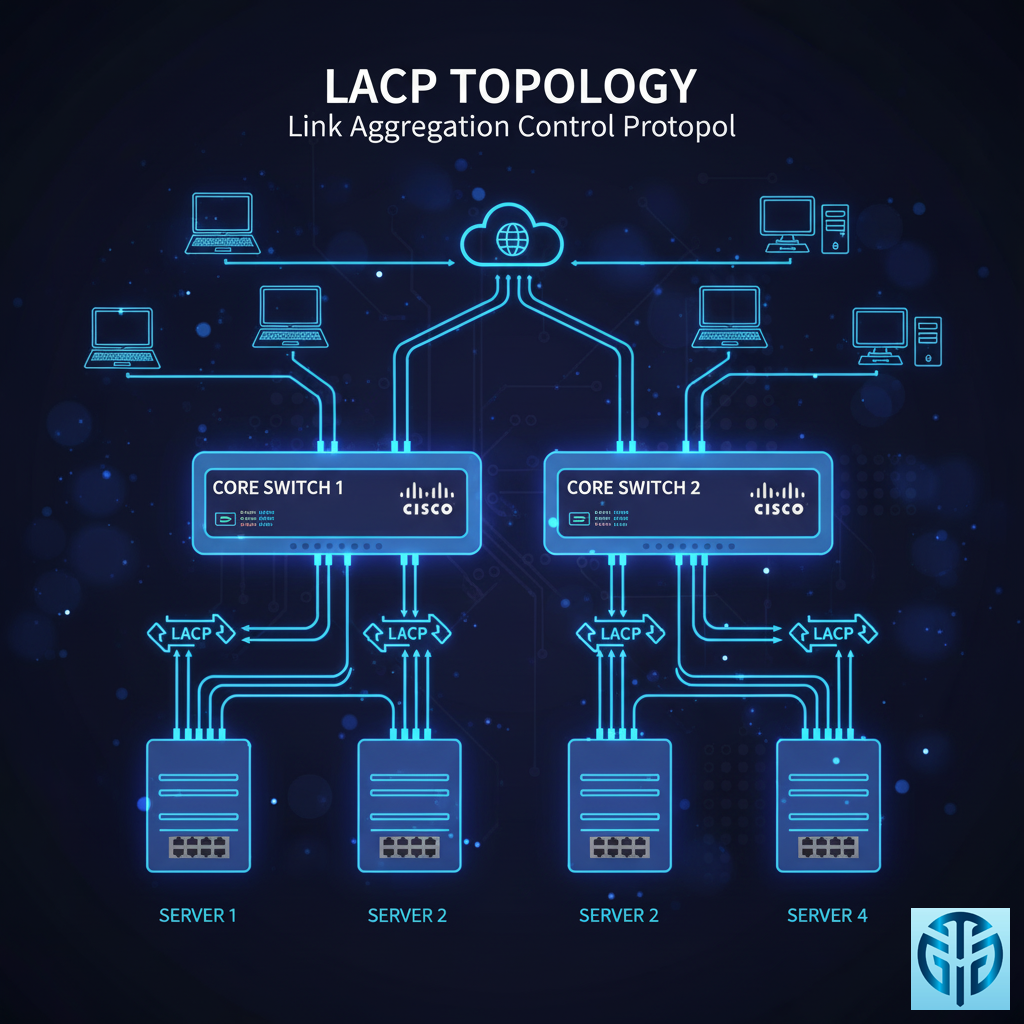
Bayangkan ini:
Anda punya beberapa jalan kecil menuju satu tujuan. LACP itu seperti menggabungkan jalan-jalan kecil itu menjadi jalan raya besar yang bisa menampung lebih banyak kendaraan sekaligus!
🔍 APA ITU LACP?
LACP = Link Aggregation Control Protocol
Analoginya: Seperti menggabungkan beberapa jalur kecil menjadi satu jalur super
Fungsi: Menggabungkan multiple port Ethernet menjadi satu logical link
Tujuan: Meningkatkan bandwidth dan redundancy
Contoh Visual:
Port 1: [██████]   \
Port 2: [██████]    → Gabung → [████████████████] ← SUPER HIGHWAY!
Port 3: [██████]    /
Port 4: [██████]   /
⚡ MENGAPA BUTUH LACP?
1. Bandwidth Lebih Besar
Dulu: 1 port 1Gbps = 1000 Mbps
Dengan LACP: 4 port 1Gbps = 4000 Mbps!
Seperti: Dari jalan kampung jadi jalan tol 4 lajur
2. Redundancy & Failover
Jika 1 kabel putus: Traffic otomatis pindah ke kabel lain
Zero downtime: Tidak ada interupsi koneksi
Seperti: Ada jalan alternatif jika ada kemacetan
3. Load Balancing
Traffic dibagi merata ke semua port
Tidak ada port yang overload sendirian
🔧 CARA KERJA LACP STEP-BY-STEP
Step 1: Negosiasi (LACP Handshake)
Switch A: "Hai, saya support LACP, mau teaming?"
Switch B: "Saya juga support! Ayo gabung kekuatan!"
Step 2: Pembentukan Link Aggregation Group (LAG)
Physical Ports: [G1/0/1] [G1/0/2] [G1/0/3] [G1/0/4]
↓ LACP Magic ↓
Logical Group: [Port-Channel 1] ← 4Gbps total bandwidth
Step 3: Load Distribution
Data Stream: [████████████████████████]
↓ Dibagi merata ↓
Port 1: [██████]
Port 2: [██████]
Port 3: [██████]
Port 4: [██████]
🎯 ALGORITMA LOAD BALANCING
LACP pakai “Traffic Distribution Policy”:
Berdasarkan MAC Address:
Source MAC: AA:BB:CC:DD:EE:FF → Port 1
Source MAC: 11:22:33:44:55:66 → Port 2
Source MAC: FF:EE:DD:CC:BB:AA → Port 3
Berdasarkan IP Address:
Source IP: 192.168.1.10 → Port 1
Source IP: 192.168.1.11 → Port 2
Source IP: 192.168.1.12 → Port 3
Berdasarkan TCP Port:
HTTP (port 80) → Port 1
FTP (port 21)  → Port 2
SSH (port 22)  → Port 3
🚨 FAILOVER PROTECTION
Scenario: Kabel Putus!
SEBELUM: [Port1][Port2][Port3][Port4] ← All active
KABEL PORT 2 PUTUS: [Port1][---][Port3][Port4] ← Auto reroute!
↓
Traffic dari Port 2 pindah ke Port 1,3,4
↓
USER TIDAK SADAR ADA MASALAH! ✨
🛠️ KONFIGURASI PRAKTIS
Di Cisco Switch:
! Buat port-channel interface
interface Port-channel1
 description LACP-Trunk-to-Server
 switchport mode trunk

! Konfigurasi physical ports
interface range GigabitEthernet1/0/1-4
 channel-group 1 mode active
 switchport mode trunk
Di HP/Aruba Switch:
# Buat trunk group
trunk 1-4 trk1 lacp
Status Monitoring:
Show lacp neighbor    ← Lihat partner LACP
Show etherchannel summary ← Cek status group
Show interface trunk  ← Monitor traffic
📊 PERBANDINGAN MODE LACP
| Mode | Keterangan | Use Case |
|---|---|---|
| Active | Initiate LACP negotiation | Recommended |
| Passive | Wait for partner initiation | Backup mode |
| On | Static tanpa LACP | Legacy systems |
🎯 REAL-WORLD EXAMPLES
Example 1: Server Connection
[ SERVER ] ← 4x NIC (Network Interface Card)
     ⇅
[ SWITCH ] ← 4x Port (Port-Channel 1)
RESULT: 4Gbps bandwidth ke server!
Example 2: Switch-to-Switch
[ CORE SWITCH ] ← LACP 8 ports → [ ACCESS SWITCH ]
RESULT: 8Gbps backbone connection!
Example 3: Workstation High-Perf
[ VIDEO EDITING PC ] ← LACP 2 ports → [ SWITCH ]
RESULT: Transfer file video 2x lebih cepat!
⚠️ ATURAN PENTING LACP
Harus Sama Semua:
✅ Speed (1Gbps/10Gbps)
✅ Duplex (Full Duplex)
✅ VLAN Configuration
✅ MTU Size
Batasan Umum:
Max 8 ports per group (tergantung switch)
Harus antara 2 devices yang sama
Harus support LACP kedua sisi
🔧 TROUBLESHOOTING TIPS
Problem: LACP Tidak UP
# Cek kompatibilitas setting
Show interface status
Show lacp internal
Show running-config interface
Problem: Traffic Tidak Balance
# Cek load balancing algorithm
Show etherchannel load-balance
Show mac-address-table
Problem: Performance Buruk
# Cek error dan utilization
Show interface counters
Show interface trunk
📈 KEUNTUNGAN IMPLEMENTASI LACP
Untuk Data Center:
Higher bandwidth server connections
Zero downtime maintenance
Better utilization of network resources
Untuk Enterprise:
Redundant links critical systems
Scalable bandwidth as needs grow
Future-proof infrastructure
Untuk SMB:
Cost-effective bandwidth upgrade
Professional features tanpa harga enterprise
Reliability untuk business-critical apps
🎮 VISUALIZATION SUCCESS
Before LACP:
[SERVER] ← 1Gbps → [SWITCH] = 1000 Mbps MAX!
Traffic jam saat banyak user akses 🚗🚗🚗🚗
After LACP:
[SERVER] ← 4Gbps → [SWITCH] = 4000 Mbps SUPER!
Traffic lancar bahkan saat peak hours 🚀🚀🚀🚀
💡 BEST PRACTICES
Always Use LACP Active Mode – lebih reliable
Use Even Number of Ports – untuk balance optimal
Monitor Utilization – pastikan traffic terdistribusi merata
Document Configuration – untuk troubleshooting mudah
Test Failover Scenario – pastikan redundancy work
Kesimpulan: LACP itu seperti superpower untuk jaringan – mengubah multiple kabel biasa menjadi satu sambungan super yang cepat dan handal. Dengan LACP, Anda dapat bandwidth lebih besar + redundancy tanpa biaya tambahan infrastructure!
Tinggalkan Balasan
Anda harus masuk untuk berkomentar.