




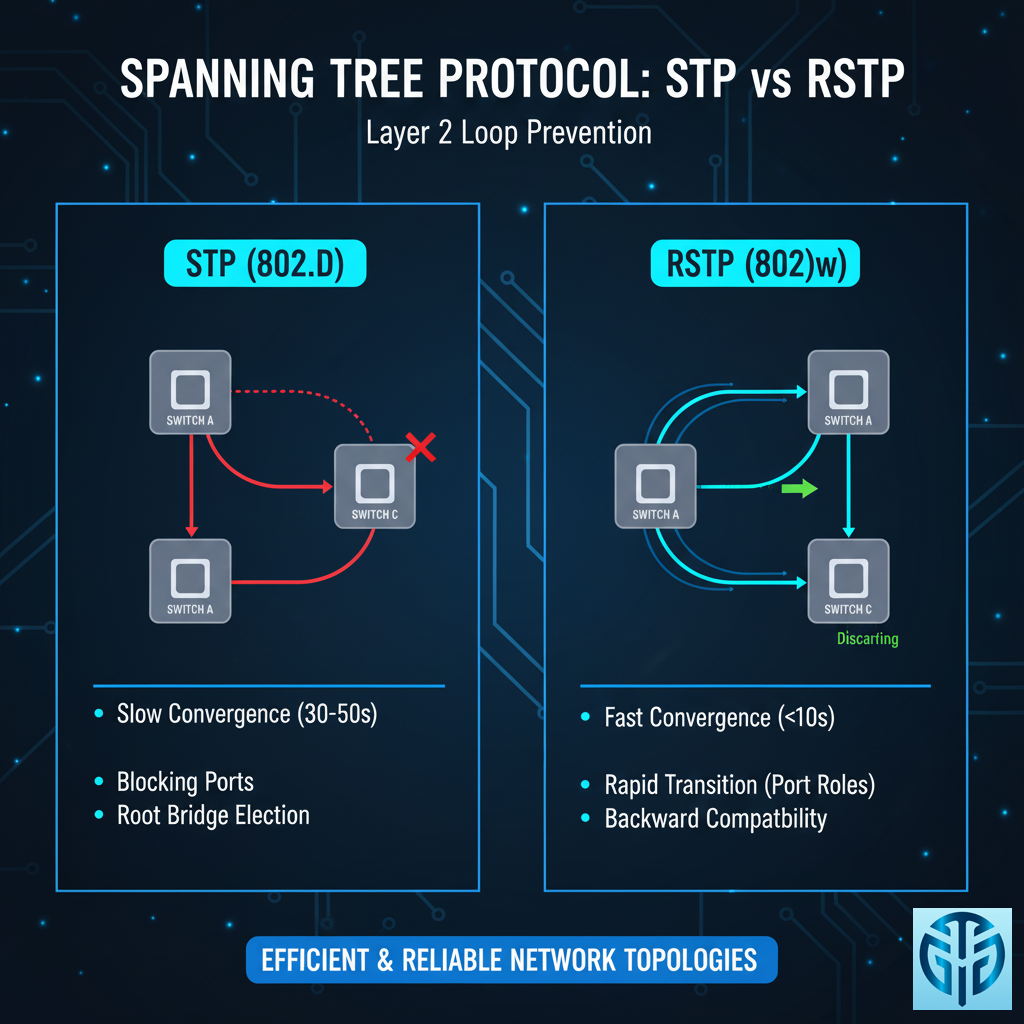
Bayangkan ini:
Kalau punya multiple switch yang saling terhubung, tanpa STP/RSTP seperti punya persimpangan tanpa lampu lalu lintas – pasti tabrakan dan kemacetan!
🔍 APA ITU STP & RSTP?
STP = Spanning Tree Protocol
RSTP = Rapid Spanning Tree Protocol
Analoginya: STP seperti lampu lalu lintas manual, RSTP seperti lampu cerdas dengan sensor
Fungsi: Mencegah switching loops di jaringan Layer 2
Tujuan: Membuat loop-free topology sambil tetap menjaga redundancy
Masalah Tanpa STP:
SW1 ↔ SW2 ↔ SW3 ← Terbentuk loop!
↓
Broadcast storm ⚡
MAC table corruption 💥
Network collapse 🔥
⚡ MENGAPA BUTUH STP/RSTP?
Scenario: Redundant Links
[PC1]--[SW1]====[SW2]--[PC2]
         \      /
          \    /
           [SW3]
Tanpa STP: Frame berputar-putar selamanya!
Dengan STP: Satu link di-block untuk cegah loop!
🎯 CARA KERJA STP (Spanning Tree Protocol)
Step 1: Root Bridge Election
Switch dengan Bridge ID terkecil menjadi "RAJA"
Bridge ID = Priority + MAC Address
↓
[SW1] ← Root Bridge (Priority 32768)
[SW2] ← Non-Root Bridge
[SW3] ← Non-Root Bridge
Step 2: Port Role Assignment
Root Ports (RP)    ← Port menuju Root Bridge
Designated Ports (DP) ← Port yang forward traffic
Blocked Ports      ← Port yang di-block untuk cegah loop
Step 3: Topology Convergence
[SW1] (Root Bridge)
  │DP
[SW2]
  │RP    │DP (Blocked) ← DI-BLOCK!
[SW3]═══[SW4]
Proses STP Lambat: 30-50 detik untuk convergence! 🐢
🚀 RSTP (Rapid STP) – STP yang Lebih Cepat
Perbaikan RSTP:
Convergence time: 2-5 detik (vs 30-50 detik STP)
Port states lebih sederhana
Backup port concept
Proposal/Agreement mechanism
Perbandingan Port States
| STP States | RSTP States | Keterangan |
|---|---|---|
| Blocking | Discarding | Tidak forward traffic |
| Listening | Discarding | Sama seperti blocking |
| Learning | Learning | Belajar MAC addresses |
| Forwarding | Forwarding | Normal operation |
🔧 PORT ROLES & STATES
STP Port Roles:
Root Port – Menuju root bridge
Designated Port – Forward traffic
Blocking Port – Di-block untuk cegah loop
Disabled Port – Administratively down
RSTP Additional Roles:
Alternate Port – Backup untuk root port
Backup Port – Backup untuk designated port
📊 STP vs RSTP HEAD-TO-HEAD
| Parameter | STP (802.1D) | RSTP (802.1w) |
|---|---|---|
| Convergence | 30-50 detik | 2-5 detik |
| Port States | 5 states | 3 states |
| Backup Ports | Tidak ada | Alternate & Backup |
| Compatibility | Standard | Backward compatible |
| Complexity | Simple | Lebih complex |
🎯 ROOT BRIDGE ELECTION PROCESS
Step-by-Step Election:
Compare Priority (default 32768) – Lebih kecil menang
Compare MAC Address – Lebih kecil menang
Port Priority/Port ID – Jika masih sama
Contoh:
SW1: Priority 32768 + MAC 00:11:22:33:44:55
SW2: Priority 32768 + MAC 00:11:22:33:44:66
↓
SW1 MENANG! ← MAC address lebih kecil
🛠️ KONFIGURASI PRAKTIS
Cisco STP Configuration:
! Enable STP
 spanning-tree mode pvst

! Set root bridge priority
 spanning-tree vlan 1 priority 4096

! Set port cost
 interface GigabitEthernet1/0/1
 spanning-tree cost 19

! PortFast untuk access ports
 spanning-tree portfast
Cisco RSTP Configuration:
! Enable RSTP
 spanning-tree mode rapid-pvst

! Optional: tune timers
 spanning-tree hello-time 1
 spanning-tree forward-time 4
 spanning-tree max-age 6
🚨 COMMON STP ISSUES & SOLUTIONS
1. Root Bridge Terpilih Salah
Problem: Switch tua jadi root bridge
Solution: Manual set root bridge priority
spanning-tree vlan 1 priority 8192
2. STP Convergence Lambat
Problem: Network down 30+ detik saat failover
Solution: Migrate ke RSTP
spanning-tree mode rapid-pvst
3. PortFast Related Issues
Problem: Loops karena PortFast di trunk port
Solution: BPDU Guard protection
spanning-tree portfast
spanning-tree bpduguard enable
🛡️ STP SECURITY FEATURES
1. BPDU Guard
! Block BPDU di access ports
spanning-tree bpduguard enable
2. Root Guard
! Cegah root bridge takeover
spanning-tree guard root
3. Loop Guard
! Deteksi unidirectional links
spanning-tree loopguard default
🌍 REAL-WORLD SCENARIOS
Scenario 1: Campus Network
[Core Switch] ← Root Bridge
    │    │
[Building A] [Building B]
    │    │
[Floor 1] [Floor 2] ← Automatic blocking jika ada loop
Scenario 2: Data Center
[Spine 1]══[Spine 2]
   │  \      /  │
[Leaf 1] [Leaf 2] ← RSTP untuk fast convergence
Scenario 3: Office Network
[Main Switch] ← Root Bridge
   │     │
[SW A]  [SW B] ← Satu link aktif, satu standby
   │     │
[Users] [Users]
🔧 TROUBLESHOOTING COMMANDS
Show STP Status:
show spanning-tree summary
show spanning-tree vlan 1
show spanning-tree interface Gi1/0/1
show spanning-tree root
Debug STP Issues:
debug spanning-tree events
show logging | include STP
show spanning-tree inconsistentports
📈 BEST PRACTICES DEPLOYMENT
1. Manual Root Bridge Selection
! Jadikan core switch sebagai root
spanning-tree vlan 1-4094 priority 8192
2. Enable PortFast + BPDU Guard
! Untuk semua access ports
interface range Gi1/0/1-24
 spanning-tree portfast
 spanning-tree bpduguard enable
3. Use RSTP Instead of STP
! Untuk faster convergence
spanning-tree mode rapid-pvst
4. Tune STP Timers (Jika Perlu)
! Hati-hati! Hanya jika diperlukan
spanning-tree hello-time 1
spanning-tree forward-time 4
🚀 MIGRATION STP → RSTP
Step-by-Step Migration:
Backup configuration existing STP
Verify topology dan root bridge placement
Enable RSTP di semua switch
Monitor convergence selama maintenance window
Verify operation dengan test failover
Migration Command:
! Dari STP ke RSTP
 spanning-tree mode rapid-pvst
🎮 VISUALIZATION STP/RSTP IN ACTION
Before STP:
[SW1] ↔ [SW2] ↔ [SW3] ← BROADCAST STORM! 💥
Frame berputar-putar selamanya
Network crash dalam hitungan detik
After STP:
[SW1] (Root Bridge)
  │DP
[SW2]
  │RP    │DP (Blocked) ← AMAN! ✅
[SW3]═══[SW4]
After Link Failure:
[SW1] (Root Bridge)
  │DP
[SW2]
  │RP    │DP (Now Forwarding) ← AUTO FAILOVER! 🔄
[SW3]═══[SW4] (Link SW2-SW3 down)
💡 FUN FACTS STP/RSTP
Ditemukan 1985 oleh Radia Perlman – “Idea for a homework!”
STP algorithm disebut “spanning tree” dari graph theory
BPDU = Bridge Protocol Data Unit – “Bahasa” STP
RSTP bisa 100x lebih cepat dari STP!
Modern networks pakai RSTP atau MST (Multiple STP)
🌟 KESIMPULAN
STP adalah: Foundation jaringan switched – sederhana tapi powerful
RSTP adalah: STP yang dipercepat – untuk modern networks
Gunakan STP ketika:
✅ Network kecil & sederhana
✅ Legacy equipment
✅ Tidak butuh fast convergence
Gunakan RSTP ketika:
✅ Network medium to large
✅ Butuh fast failover (<5 detik)
✅ Modern switches support
Ingat: Tanpa STP/RSTP, jaringan switched Anda seperti kota tanpa lampu lalu lintas – chaos guaranteed! 🚦
Tinggalkan Balasan
Anda harus masuk untuk berkomentar.